Manual
Search
Manual Top Page
> Function List > Mixed Fraction
Operation
About this Service
What You Can Do With this Service
About the Screens in this Service
How to use the manual
Login and Logout
Account information
Logging In
Switching the Display Language
Logging Out
Student
Using the Lesson and Self-study Screens
Displaying the Lesson/Self-study Screen
Creating New Notebooks
Opening Created Notebooks
Creating Folders
Organizing Notebooks/Folders
Changing the Screen Display
Changing the display order for notebooks/folders
Using Notebooks
Creating Text/Handwritten Sticky Notes
Creating Sticky Notes From Photos or Movies Shot on a Camera
Creating Sticky Notes with Links
Creating Images, Movies and PDF/Office Files as Sticky Notes
Viewing PDF/Office files linked to Sticky Notes
Downloading PDF/Office file Sticky Notes
Creating Sticky Notes of the Linked PDF File
Displaying the ClassPad Math
Entering Text
Entering Handwritten Text on a Sticky Note
Entering Handwritten Text in a Notebook
Using Templates
Using Stamps
Adding Audio to a Sticky Note
Using Lines to Connect Sticky Notes
Using the Pointer Tool
Editing Sticky Notes
Locking a Sticky Note
Saving Sticky Notes
Checking Saved Sticky Notes
Creating Folders
Organizing Folders/Sticky Notes
Changing the Save Sticky Note Screen Display
Changing the display order for folders/sticky notes
Exporting a Notebook as an Image/a PDF File Download notebook as PNG/PDF file
Publishing or Downloading Notebooks
Using ClassPad Math
Functions that Require a License
Displaying a ClassPad Math Paper
Guide to the Paper Screen
Saving Paper Content
Working with Papers
Creating a Text Sticky Note
Arithmetic and Function Calculations
Graphing and Numerical Table Creation
Statistical Calculations
Geometry
Sequence
Number Line
Financial
Auto Generating sticky notes from ClassWiz (QR Code Function)
ClassWiz sticky note (scientific calculator emulator)
ColorGraph(scientific calculator emulator)
Function List
Abbreviations and Punctuation Used in This Section
Trigonometric and Inverse Trigonometric Functions
Hyperbolic and Inverse Hyperbolic Functions
Angle Units
Mixed Fraction
Logarithmic Function
Numeric Calculations
Random Number Generator
Integer Functions
Permutation and Combination
Other Functions
Transformation
Advanced
Calculation
Complex number calculations
List
Matrix
Vector
Equation/Inequality
Assistant
Distribution/Inverse Distribution
etc
Managing Licenses (Contents)
Purchasing Licenses from ClassPad.net Store
Entering Additional License Codes
Deleting Licenses (Contents)
Manual OSS License
Manual ChangeLog
×
Operation
About this Service
What You Can Do With this Service
About the Screens in this Service
How to use the manual
Login and Logout
Account information
Logging In
Switching the Display Language
Logging Out
Personal
Using the Lesson and Self-study Screens
Displaying the Lesson/Self-study Screen
Creating New Notebooks
Opening Created Notebooks
Creating Folders
Organizing Notebooks/Folders
Changing the Screen Display
Changing the display order for notebooks/folders
Using Notebooks
Creating Text/Handwritten Sticky Notes
Creating Sticky Notes From Photos or Movies Shot on a Camera
Creating Sticky Notes with Links
Creating Images, Movies and PDF/Office Files as Sticky Notes
Viewing PDF/Office files linked to Sticky Notes
Downloading PDF/Office file Sticky Notes
Creating Sticky Notes of the Linked PDF File
Displaying the ClassPad Math
Entering Text
Entering Handwritten Text on a Sticky Note
Entering Handwritten Text in a Notebook
Using Templates
Using Stamps
Adding Audio to a Sticky Note
Using Lines to Connect Sticky Notes
Using the Pointer Tool
Editing Sticky Notes
Locking a Sticky Note
Saving Sticky Notes
Checking Saved Sticky Notes
Creating Folders
Organizing Folders/Sticky Notes
Changing the Save Sticky Note Screen Display
Changing the display order for folders/sticky notes
Exporting a Notebook as an Image/a PDF File
Publishing or Downloading Notebooks
Using ClassPad Math
Functions that Require a License
Displaying a ClassPad Math Paper
Guide to the Paper Screen
Saving Paper Content
Working with Papers
Creating a Text Sticky Note
Arithmetic and Function Calculations
Graphing and Numerical Table Creation
Statistical Calculations
Geometry
Sequence
Number Line
Financial
Auto Generating sticky notes from ClassWiz (QR Code Function)
ClassWiz sticky note (scientific calculator emulator)
ColorGraph (scientific calculator emulator)
Function List
Abbreviations and Punctuation Used in This Section
Trigonometric and Inverse Trigonometric Functions
Hyperbolic and Inverse Hyperbolic Functions
Angle Units
Mixed Fraction
Logarithmic Function
Numeric Calculations
Random Number Generator
Integer Functions
Permutation and Combination
Other Functions
Transformation
Advanced
Calculation
Complex number calculations
List
Matrix
Vector
Equation/Inequality
Assistant
Distribution/Inverse Distribution
etc
Managing Licenses (Contents)
Purchasing Licenses from ClassPad.net Store
Entering Additional License Codes
Deleting Licenses (Contents)
Manual OSS License
Manual ChangeLog
Mixed Fraction
mixedFraction
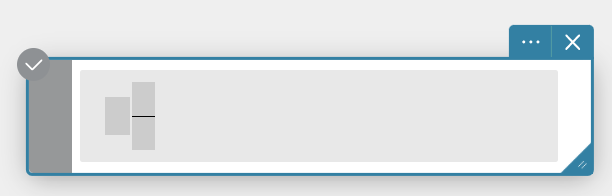
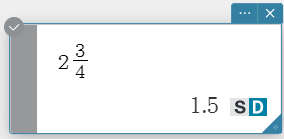
Syntax: \(\displaystyle■\frac□□\)
Operation
About this Service
What You Can Do With this Service
About the Screens in this Service
How to use the manual
Login and Logout
Account information
Logging In
Switching the Display Language
Logging Out
Personal
Using the Lesson and Self-study Screens
Displaying the Lesson/Self-study Screen
Creating New Notebooks
Opening Created Notebooks
Creating Folders
Organizing Notebooks/Folders
Changing the Screen Display
Changing the display order for notebooks/folders
Using Notebooks
Creating Text/Handwritten Sticky Notes
Creating Sticky Notes From Photos or Movies Shot on a Camera
Creating Sticky Notes with Links
Creating Images, Movies and PDF/Office Files as Sticky Notes
Viewing PDF/Office files linked to Sticky Notes
Downloading PDF/Office file Sticky Notes
Creating Sticky Notes of the Linked PDF File
Displaying the ClassPad Math
Entering Text
Entering Handwritten Text on a Sticky Note
Entering Handwritten Text in a Notebook
Using Templates
Using Stamps
Adding Audio to a Sticky Note
Using Lines to Connect Sticky Notes
Using the Pointer Tool
Editing Sticky Notes
Locking a Sticky Note
Saving Sticky Notes
Checking Saved Sticky Notes
Creating Folders
Organizing Folders/Sticky Notes
Changing the Save Sticky Note Screen Display
Changing the display order for folders/sticky notes
Exporting a Notebook as an Image/a PDF File
Publishing or Downloading Notebooks
Using ClassPad Math
Functions that Require a License
Displaying a ClassPad Math Paper
Guide to the Paper Screen
Saving Paper Content
Working with Papers
Creating a Text Sticky Note
Arithmetic and Function Calculations
Graphing and Numerical Table Creation
Statistical Calculations
Geometry
Sequence
Number Line
Financial
Auto Generating sticky notes from ClassWiz (QR Code Function)
ClassWiz sticky note (scientific calculator emulator)
ColorGraph (scientific calculator emulator)
Function List
Abbreviations and Punctuation Used in This Section
Trigonometric and Inverse Trigonometric Functions
Hyperbolic and Inverse Hyperbolic Functions
Angle Units
Mixed Fraction
Logarithmic Function
Numeric Calculations
Random Number Generator
Integer Functions
Permutation and Combination
Other Functions
Transformation
Advanced
Calculation
Complex number calculations
List
Matrix
Vector
Equation/Inequality
Assistant
Distribution/Inverse Distribution
etc
Managing Licenses (Contents)
Purchasing Licenses from ClassPad.net Store
Entering Additional License Codes
Deleting Licenses (Contents)
Manual OSS License
Manual ChangeLog